

SpaceX's space internet solution Starlink is available to order Australia-wide. Satellite internet has long been accepted as an internet connection solution for regional and rural Australians, but it's typically been much slower and less reliable than what is available in metro areas.
Starlink, however, promises faster speeds than Satellite NBN with lower latency, which could be a major boon for those after faster rural connectivity.
What is Starlink internet?
Starlink is a low-Earth orbit (LEO) satellite internet system offered by SpaceX that aims to deliver high-speed internet across the globe. Starlink is being pitched as the internet solution of choice in areas where connectivity has been challenging, such as rural and regional Australia.
The major difference between Starlink satellites and traditional geostationary orbit (GEO) satellites is that they're 65 times closer to Earth. This means Starlink's satellites can deliver faster, more responsive connectivity than you'd typically expect from a traditional satellite internet service. As they move more quickly over the Earth, LEO satellites work in a network called a constellation to provide continuous coverage.
Presented by: Anula Wiwatowska - WhistleOut telco expert:
Alright I get it your guys want to talk about Starlink, so let’s talk about it.
If you don’t know, Starling is a satellite internet provider that uses low earth orbit satellites or LEOs.
Since these LEOs are way closer than traditional ones, it makes for faster speeds and better latency. It all sounds good right? And it is for a lot of Australians, but not for everyone.
So if you live out bush, Starlink is going to give your better performance than NBN Sky Muster, but if you live in a metro area then you’re going to run into some problems.
First up, if the satellite dish needs a direct line of sight to the sky. Trees, building and planes can block the connection between your satellite dish and the LEOs, which is going to make your connection slower and less reliable.
When we tested Starling in a metro location, we were getting as many as 19 outages per day because of issues like that.
Then there are the congestion charges for city dwellers. If you’re trying to connect in a metro area, then Starlink Australia will charge you $145 as a congestion fee. That’s a pretty big upfront cost.
Okay, so there is plenty more to unpack here, but thats enough for one video. Tell me, what else do you want to know?
Starlink Residential plans
Starlink currently offers three Residential plans. Two have speeds capped to 100Mbps and 200Mbps respectively, while the third is uncapped up to technical maximums.
In Australia, Starlink Residential plans start at $75 per month, ongoing. More recently, Starlink has started offering introductory deals. We've seen prices as low as $49 per month for the first four months.
Here's a look at Starlink's Residential plans:
|
Starlink

Starlink Residential 100 Mbps
$75/mth
Min. cost $75
|
|
Starlink
Starlink Residential 200 Mbps
$110/mth
Min. cost $110
|
|
Starlink
Starlink Residential Max
$150/mth
Min. cost $150
|
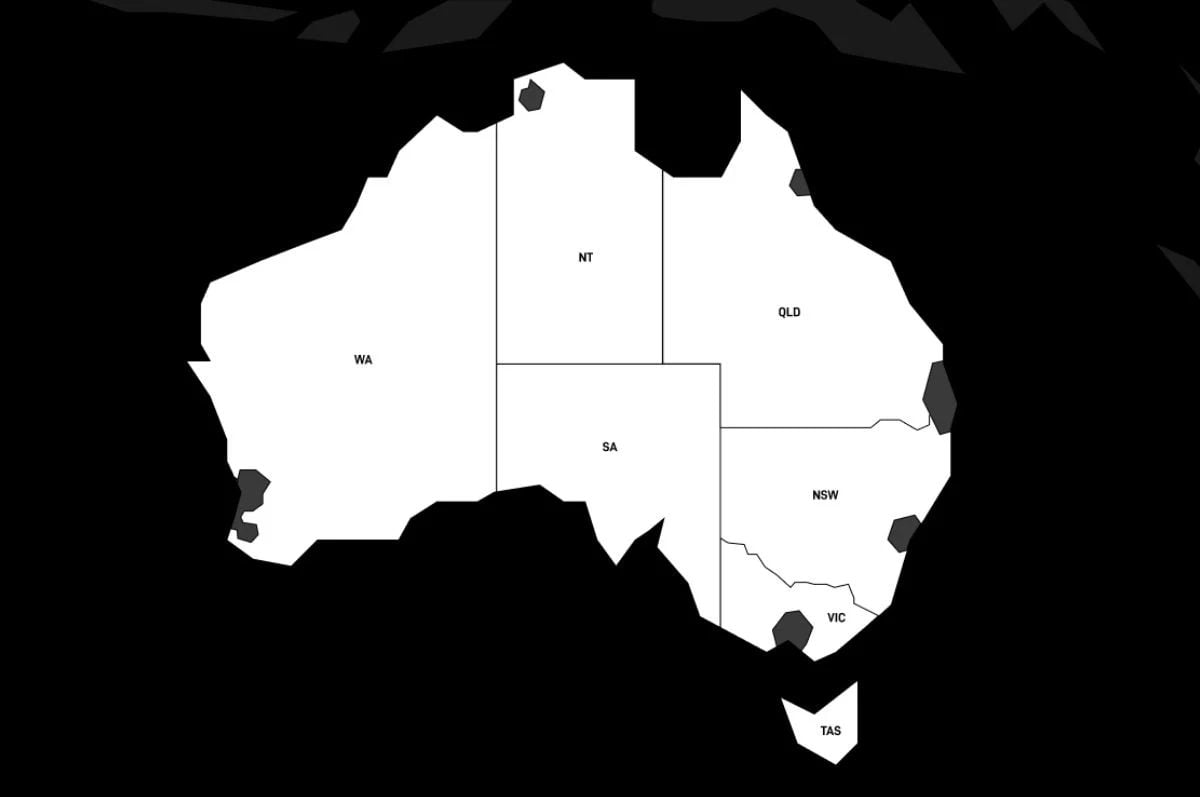
In some areas, Starlink may charge a one-off congestion charge of $145 when you purchase a Residential plan. Starlink says its intention is to "no longer charge this fee to new customers as soon as network capacity improves".
You'll be notified of any congestion charge after inputting your address on Starlink's website, but for an idea, you can use the following map. Areas that may be subject to a congestion charge are coloured grey:
Telstra and Starlink have a partnership that allows the telco to sell home phone and internet plans powered by the satellite service.
Telstra's Satellite Internet plan is more expensive than the majority of Starlink's Residential plans ordered direct at $125 per month and only offers maximum speeds of 50Mbps for downloads and 10Mbps for uploads. You do still need to pay the upfront hardware fee of $549, which may be discounted occasionally.

What equipment do I need for Starlink?
To get connected to Starlink's LEO constellation, you'll need its Standard Kit. Starlink offers this to Residential customer as a $15 per month rental and it includes both the Standard Dish (Gen 4) and a Starlink router. Valued at $549, if you cancel your Starlink plan, you'll need to return the kit in good working condition or pay the full price. Additionally, you'll need to pay $19 in shipping and taxes when you order your Starlink Residential plan.
While Starlink kits can be ordered outright with your plan, you can also purchase a Starlink kit from retailers in Australia such as Kogan, Officeworks, or JB Hi-Fi. The cost of the hardware is usually the same, but you may be able to select a click-and-collect option or get free delivery in metro areas. If purchasing a kit from a retailer, you'll still need to sign up for a Starlink plan separately.
Starlink is designed to be a self-install set-up. The dish just needs a clear line of sight to connect with Starlink's constellation. However, it may take a couple of weeks or more for your Starlink equipment to be shipped to your address. Actual arrival time will depend on where you live in Australia and the type of kit you order.
If you can't find a clear field of view from ground level, you'll want to consider a roof installation, which could delay set-up time. Roof mounts for the dish are sold separately. If you opt for professional installation, you'll receive an email with further instructions on booking it after you check out.
Keep in mind, it's illegal to do your own fixed cabling in Australia. Any in-wall, in-roof, or under-floor cabling must be done by a registered cabler, and that could impact your set-up time.
Other Starlink internet plans
Starlink has a few different plan types, including those suitable for business and power users, as well as for use on the go.
Starlink Priority plans
Starlink Priority (also sometimes referred to as Starlink for Businesses) is the company's premium service tier originally designed for use by businesses where service uptime may be critical. It may also be suitable for high-demand power users.
These plans start at $108 per month, plus $549 for a Standard Kit, which includes shipping and handling. You can also upgrade to the more expensive Starlink Performance Kit for $3,599, but this also requires you to purchase the Starlink Mini Router separately (for $150).
At the time of writing, Starlink's Priority plans offer download speeds between 135 and 310Mbps. These represent a solid increase from the speeds users can expect on capped Residential plans. Upload speeds are between 20 to 44Mbps.
With one of these plans, you'll get an allocation of Priority Data. After you've gone through your Priority Data, you'll continue to use your Starlink internet connection with unlimited data, but at the much slower speeds of 1Mbps download and 0.5Mbps upload.
Additional "data blocks" can be purchased to top up with 50GB ($38) and 500GB ($190).
Here's a look at Starlink's Local Priority plans:
|
Starlink
Starlink Local Priority 50GB
$84/mth
+ $549 Upfront
Min. cost $633
|
|
Starlink
Starlink Local Priority 500GB
$236/mth
+ $549 Upfront
Min. cost $785
|
|
Starlink
Starlink Local Priority 1TB
$426/mth
+ $549 Upfront
Min. cost $975
|
|
Starlink
Starlink Local Priority 2TB
$806/mth
+ $549 Upfront
Min. cost $1,355
|
Starlink Roam plans
Given that Starlink internet uses a network of satellites, it stands to reason that you don't need a fixed address to use the service. The company offers mobile satellite plans for RVs, nomads and campers and even maritime options.
You can get a Roam plan with 100GB of data for $85 per month or an unlimited data plan for $210 per month. If you want to get connected on the go, then you can get the Starlink Mini. The Mini itself costs $399, plus $19 in shipping.
As with fixed Starlink options, there's a more expensive Priority roam plan. These plans start at $395 per month and can be purchased with the much more expensive Performance Kit for $3,599. It costs $85 in shipping, you'll also need a Mini Router for $150.
Here's a look at Starlink's plans for use on the go:
|
Starlink
Starlink Roam 100GB
$85/mth
+ $289 Upfront
Min. cost $374
|
|
Starlink
Starlink Roam Unlimited
$210/mth
+ $289 Upfront
Min. cost $499
|
|
Starlink
Starlink Global Priority 50GB
$395/mth
+ $3,689 Upfront
Min. cost $4,084
|
|
Starlink
Starlink Global Priority 500GB
$1,035/mth
+ $3,689 Upfront
Min. cost $4,724
|
|
Starlink
Starlink Global Priority 1TB
$1,835/mth
+ $3,689 Upfront
Min. cost $5,524
|
|
Starlink
Starlink Global Priority 2TB
$3,435/mth
+ $3,689 Upfront
Min. cost $7,124
|
How fast is Starlink internet in Australia?

Satellite services don't display typical evening speed information like NBN services do. Starlink offers download speeds between 80Mbps and 400Mbps, with a latency of 25ms to 60ms. It says most customers experience download speeds of over 100Mbps.
That's potentially faster than an NBN 100 plan, but with much higher latency and more room for congestion. Most fixed-line internet plans should be able to achieve a latency of under 10ms. 20ms is roughly on par with a 4G mobile connection.
The ACCC now includes Starlink and NBN Sky Muster performance in its Measuring Broadband Australia report. In the first report, the ACCC revealed Starlink far outperformed satellite NBN on download speeds and latency.
The latest report recorded Starlink's average download speeds at 225.8Mbps at all hours and 197.3Mbps during peak hours (7pm to 11pm, weeknights). Starlink's upload speeds averaged 48Mbps during all hours and 45.9Mbps during peak hours. These speeds are well above the current limits of Satellite NBN.
Starlink doesn't have the fastest internet speeds available in Australia, but they're pretty good for satellite.
What is Starlink good for?
With better performance than Satellite NBN, Starlink is clearly a solid alternative to Sky Muster if you're in rural Australia. With speeds enabling you to do most online tasks well.
Working from home
Starlink provides enough bandwidth to get online, browse and take work calls. You may want a faster than 100Mbps plan if your work requires you to download or upload large files, as these will take longer at slower speeds.
Dropouts when in a video call can also be an issue, however. Starlink is based on a constellation of satellites, and the time it takes your dish to connect to the next satellite can impact the quality of your call.
Streaming TV shows and movies
Starlink's download speeds and latency support HD and 4K streaming of your favourite TV shows and films. You can expect roughly the same performance as at least an NBN 100 plan, which means you should be able to stream at least on a few devices simultaneously.
Gaming
In theory, Starlink should work well for some games, at least compared to Satellite NBN, which has a much higher latency, but it won't be as good as other NBN connections. Dropouts can also be an issue, however, since Starlink is based on a constellation of satellites, and the time it takes your dish to connect to the next satellite can be enough to interrupt an online game.
If you're in an NBN Fixed Wireless or fixed-line NBN area, those are a better bet. Plans start cheaper than Starlink and have better reliability and speeds. If you're stuck on a struggling FTTN connection, then you may even be able to get a free upgrade to FTTP, which enables fast speeds between 500 and 2,000Mbps.
Here's a look at Fixed Wireless plans for comparison:
|
Tangerine Telecom

Fixed Wireless Superspeedy
$79.90/mth
Min. cost $79.90
|
|
Activ8me

Fixed Wireless Super Fast
$89.95/mth
Min. cost $89.95
|
|
Superloop

nbn Fixed Wireless Super Fast (400/40)
$93/mth
Min. cost $93
|
|
Skymesh

NBN Wireless Superfast
$94.95/mth
Min. cost $94.95
Link not supplied
|
|
MATE

Fair Dinkum Wireless
$100/mth
Min. cost $100
Link not supplied
|
|
More

Fixed Wireless Superfast NBN
$115/mth
Min. cost $115
Link not supplied
|
|
Telstra

Ultimate Internet Only Plan (Fixed Wireless)
$119/mth
Min. cost $119
Link not supplied
|
|
Aussie Broadband

nbn® Fixed Wireless Superfast Unlimited
$119/mth
Min. cost $119
Link not supplied
|
|
AGL

Fixed Wireless Superfast
$124/mth
Min. cost $124
Link not supplied
|

FAQs
Where is Starlink internet available in Australia?
SpaceX's satellite internet service covers all of Australia. If you're still unsure, you'll be able to confirm that coverage is available when you enter your address on the Starlink website. To support the Starlink satellites in orbit there are 20 Starlink ground stations in Australia spread between New South Wales, Queensland, South Australia, Victoria, and Western Australia.
Can you return your Starlink Kit?
If you purchase a Starlink Kit and decide it's not right for you, you can cancel your service and return the hardware if you do so within 30 days of shipment. After the 30-day period is up, you can cancel your plan, but you won't get a refund on your plan fees or hardware.
Starlink provides instructions on how to re-box your kit.
What happens if I cancel my Starlink plan??
If you've made an order and you've changed your mind, you can cancel it and get a refund through the Starlink Customer Account Portal. Note that Starlink units on a fixed plan are tied to a specific satellite, and as such, you can't change address or move your unit without contacting the support team. Moving to a new address may incur a fee.
If you've received a Standard 4 or Standard 4 X kit on a Residential plan as a rental you must return your hardware kit in good condition within 30 days of cancelling your plan. Some wear and tear is allowed, but if you don't return the kit in good condition, you will be charged the full price of the kit.
Does Starlink have mobile plans?
No, Starlink doesn't offer a cellular service. However, Telstra isn't only working with Starlink to deliver Starlink Internet plans. A partnership with Starlink allows Telstra customers to send text messages via Starlink satellite when they don't have mobile coverage.
Optus has also been working with Starlink to extend coverage where the Optus network is unavailable. The plan was announced in 2023 but has experienced delays. The plan is for Optus customers to connect to Starlink satellites to receive SMS and then calls and mobile internet further down the track. There is no timeline for when Optus will offer Starlink functionality.
Can I take my Starlink with me if I move house?
Yes, you can keep a Starlink connection if you're moving house, but it's not as simple as simply taking your kit with you. You'll need to check that Starlink is available at your new address and log in to your account to update your address. You may need to contact customer support. When you update your address, it will disable it at your previous location, and it may not be guaranteed that you can get service again at that location. Using your Starlink equipment outside of the service area on your account could lead to slower performance or disconnection.
SOURCES
1. Starlink. July 2026
2. Australian Competition and Consumer Commission. "Measuring Broadband Australia." (April 2026)
Alex Choros

Find a better internet plan
Thousands of internet plans unpacked. All the facts. No surprises.

Related Articles


![[Hand-Picked] Best internet providers in Australia](https://r3.whistleout.com.au/public/images/articles/2026/07/man-and-woman-with-laptop-on-green-couch.jpg?w=160&h=160&usm=20&usmrad=0.8&fit=crop "[Hand-Picked] Best internet providers in Australia")
Internet Plans by State
- Internet Plans in ACT
- Internet Plans in NSW
- Internet Plans in NT
- Internet Plans in QLD
- Internet Plans in SA
- Internet Plans in TAS
- Internet Plans in VIC
- Internet Plans in WA


