

I'm not planning on having kids, but thanks to Apple, I got stuck with one for four months. Tinkering with your phone's settings might seem like a bit of harmless fun, but I learned just how easy it is to end up with an unexpected surprise.
Back in February, we decided to shoot a video about how Apple's parental controls work on iPhone and iPad. To demonstrate this, you technically need a child. At the very minimum, an Apple ID that purportedly belongs to a child. As such, I went through the steps of making an Apple ID for my "son", as any good parent would. Enter Kevin McAllister, an imaginary eight-year-old who exists for demo purposes and demo purposes alone. We filmed the video and life went on.
All was well until one of my friends asked if I wanted to go in on an Apple One subscription. I was keen as a bean and I accepted the invite, but was met with a prompt featuring some rather interesting phrasing.
"You are already in another family. You can only be in one family at a time. To join this family, you need to leave your current family first. You can change families once per year."
I forgot about Kevin.
The solution seemed simple. I'd boot my virtual son from my family in exchange for every Apple service I could want at a reasonable monthly rate. I opened up my family sharing menu, tapped on Kevin's account, but my attempts to banish him were futile. There was no option to remove him from my family.
I turned to Apple's support documents and discovered that you can't axe a child account from your family until they turn 13, or you send them to another family. Kevin was eight. If I wanted to wait it out, I wouldn't be able to remove him until 2026. I contemplated creating another Apple ID and building out a fake family for the equally fake Kevin, a fauxmily if you will, but figured I should ask Apple if there was an easier option.
I was put in touch with Apple support, who promptly escalated me to an iCloud specialist. Weirdly, removing fake children from an Apple ID isn't exactly a problem most people encounter. The iCloud specialist was genuinely helpful. I'd assumed they'd need to do back end black magic to bleep Kevin out of existence, but the solution was a lot more simple.
Thanks to the GDPR, Apple has a relatively new privacy portal where you can request account deletion. I searched through my notes app to find Kevin's password, and kicked off the process of kicking him out.
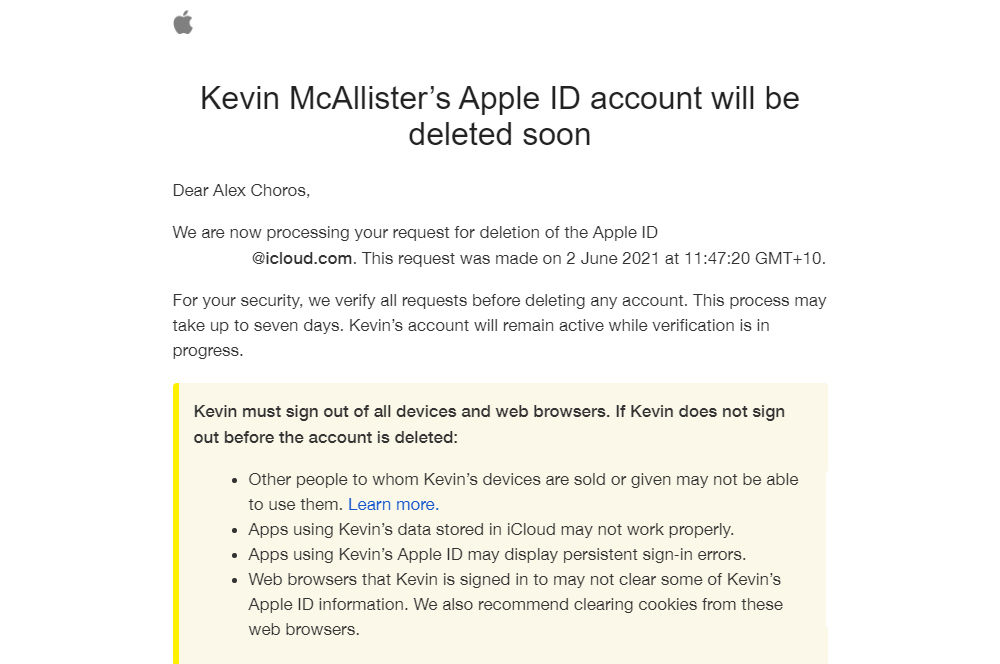
A few days later, Kevin's name no longer graced my family sharing screen. I slammed the "stop using family sharing" button with the zeal of an absent father, but Kevin's ghost still haunted me.
"Family has other members," my phone warned, as if it knew I’d never be back after going out to get smokes.
"No it doesn't," I silently screamed, defeated. Would the spectre of Kevin hang around for the next five years?
I had so many regrets. Why didn't I just make the fake family, the digital equivalent of the farm upstate? Why did I make him so young? Why did we decide to film a video about parental controls? In a cruel twist of fate, using protection had left me with a child.
Apple support suggested just waiting it out. Get back in touch if I'm still having trouble in 30 days. Ghosts can linger in machines, apparently.
For two weeks, I tried to leave my family every day, and every day I was met with the same ominous message: "family has other members".
My morning coffee became marred by looking at my family, longing for a way out. Yet Apple told me I still couldn’t leave. It wasn’t time. Not yet. I was a filthy animal for trying. My attempts to be a deadbeat dad were continuously thwarted by a pop up I couldn’t vanquish.
Until one day they weren’t. 16 days after I asked Apple to remove Kevin from my life, he was finally gone. I made my family disappear.
I was free. Free from commitment. Free to live for myself.
Free to use Apple services at a heavily discounted rate.
How to remove a child under 13 from Apple Family Sharing
If you, like me, have a child under 13 - real or otherwise - you want to remove from your family sharing, you can do so by following these steps:
- Visit privacy.apple.com
- Sign in with your child's Apple ID
- Click Get started underneath Delete your account and follow the prompts
An email will be sent to the owner of the family, where you'll need to approve the request to delete your child's account. Follow the link in the email, and sign in with your own Apple ID.
After you're done, make sure you follow Apple's recommended steps, such as signing out from any devices that use that Apple ID. If you don't sign out of these devices linked to an Apple ID before it's deleted, you'll run into all sorted of issues. All data associated with the account will be deleted, including files store in the cloud such as photos, documents, and backups.
Apple says the deletion process will take up to seven days. It may take up to 30 days before all changes go through, as I found with family sharing.
Alex Choros

Related Articles


![[Editor's Picks] Best mobile plans for October 2026](https://r3.whistleout.com.au/public/images/articles/2026/01/mobile-phone-plan-Featured.png?w=280&h=280&usm=20&usmrad=0.8&fit=crop "[Editor's Picks] Best mobile plans for October 2026")


